Flutter与OpenHarmony跨端开发:变量与数据结构实战

1. Flutter × OpenHarmony 跨端开发:变量与数据结构实战解析
1.1 前言:跨端开发的现状与挑战
作为一名长期从事跨平台开发的工程师,我深刻体会到现代应用开发中多端适配的重要性。Flutter与OpenHarmony的结合,为开发者提供了一种全新的跨端解决方案。不同于传统的Hybrid开发模式,这种组合能够实现真正的代码复用和性能优化。
在实际项目中,我发现很多开发者虽然能够快速上手Flutter的UI开发,但在处理复杂业务逻辑时,往往会忽视数据结构设计的重要性。特别是在需要适配OpenHarmony平台时,不合理的数据结构会导致严重的性能问题和维护困难。
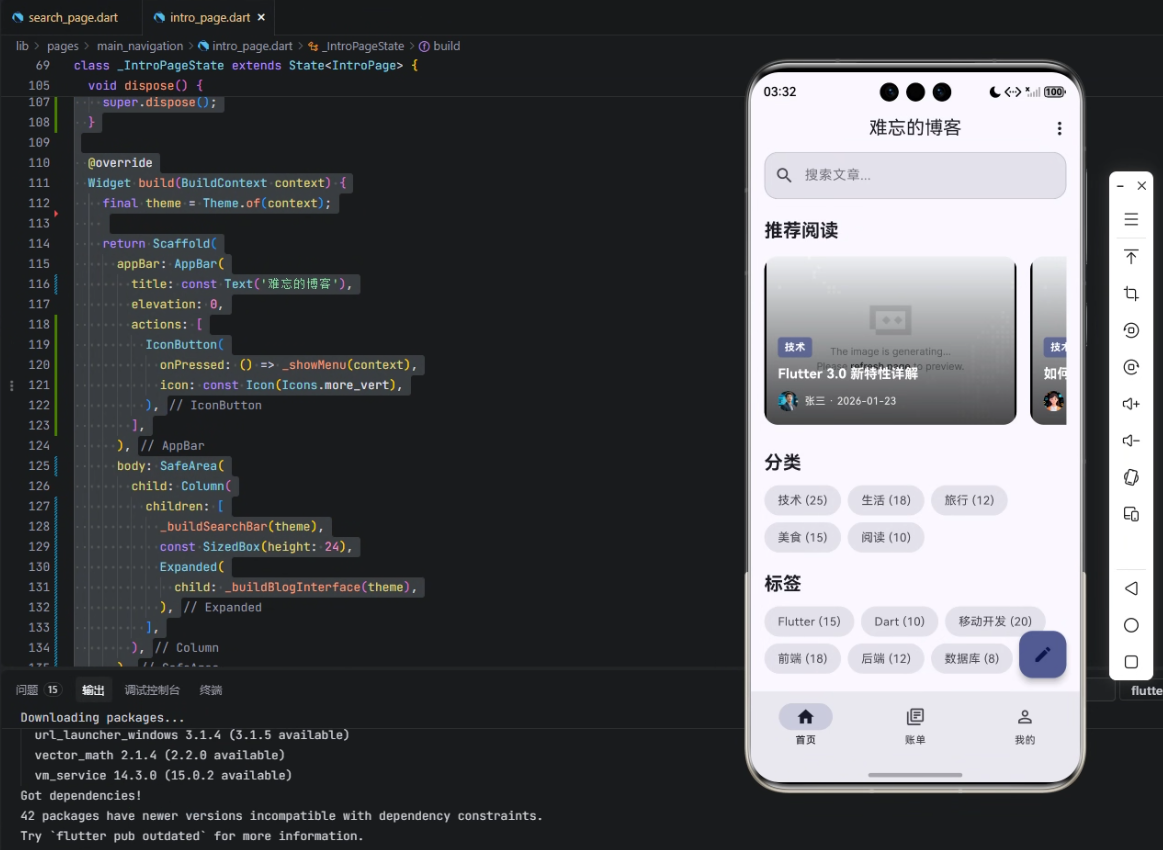
本文将以一个真实的博客应用开发为例,分享我在Flutter × OpenHarmony项目中积累的变量与数据结构设计经验。这些经验不仅适用于博客类应用,对于电商、社交等其他类型的跨端应用同样具有参考价值。
1.2 背景:为什么需要关注变量与数据结构
在跨端开发中,我们经常面临以下几个核心挑战:
-
数据一致性维护困难:不同平台对数据类型的支持存在差异,比如JavaScript的Number类型与Dart的int/double类型之间的转换问题。
-
状态同步复杂度高:当应用需要在多个设备间同步状态时(如手机和平板),如何设计高效的状态管理机制成为关键。
-
性能优化空间有限:不合理的变量声明和数据结构设计会导致内存占用过高,这在资源受限的IoT设备上尤为明显。
-
类型安全问题:动态类型语言在跨平台场景下容易引发运行时错误,需要特别关注类型安全。
通过合理的变量声明和数据结构设计,我们可以有效解决这些问题。下面这个表格对比了不同数据管理方式的优劣:
| 数据管理方式 | 优点 | 缺点 | 适用场景 |
|---|---|---|---|
| 全局变量 | 使用简单 | 难以维护,类型不安全 | 小型工具类应用 |
| 类封装 | 类型安全,可维护性强 | 需要额外编码 | 中大型商业项目 |
| 状态管理库 | 功能强大,支持响应式 | 学习成本高 | 复杂交互应用 |
| 本地存储 | 持久化支持 | 性能较差 | 需要离线支持的应用 |
2. 核心代码实现与设计思路
2.1 页面和状态定义的最佳实践
在Flutter中,我们通常使用StatefulWidget来管理有状态的页面。对于需要适配OpenHarmony的跨端应用,状态设计需要特别注意以下几点:
dart复制class IntroPage extends StatefulWidget {
  const IntroPage({super.key});

  @override
  State<IntroPage> createState() => _IntroPageState();
}

class _IntroPageState extends State<IntroPage> {
  // 状态变量声明区域
  BlogCategory? _selectedCategory;
  BlogTag? _selectedTag;
  String _searchKeyword = '';
  final TextEditingController _searchController = TextEditingController();
  List<BlogPost> _posts = [];
  List<BlogCategory> _categories = [];
  List<BlogTag> _tags = [];
  List<BlogPost> _featuredPosts = [];

  @override
  void initState() {
    super.initState();
    _initializeData();
  }

  Future<void> _initializeData() async {
    // 异步初始化数据
    _categories = await _fetchCategories();
    _tags = await _fetchTags();
    _posts = await _fetchPosts();
    _featuredPosts = _posts.where((post) => post.isFeatured).toList();
    if (mounted) setState(() {});
  }

  @override
  void dispose() {
    _searchController.dispose();
    super.dispose();
  }
}
关键设计考虑:
-
状态变量分组:将相关的状态变量分组管理,比如将UI状态(如_selectedCategory)与数据状态(如_posts)分开声明。
-
异步初始化:使用async/await处理数据加载,确保UI不会被阻塞。
-
mounted检查:在异步回调中检查mounted状态,避免在组件卸载后调用setState。
-
资源释放:在dispose方法中释放TextEditingController等资源,防止内存泄漏。
提示:在OpenHarmony平台上,由于内存管理机制不同,更需要特别注意资源的及时释放。建议对所有的控制器和订阅都实现dispose逻辑。
2.2 数据模型设计的深度解析
数据模型是跨端应用的核心基础。我们需要设计既能满足业务需求,又能在不同平台间高效传输的数据结构。以下是博客应用的完整数据模型设计:
dart复制/// 博客分类模型
class BlogCategory {
  final String id;
  final String name;
  final String slug;
  final String description;
  final int postCount;
  final String coverImage;
  final DateTime createdAt;

  BlogCategory({
    required this.id,
    required this.name,
    required this.slug,
    this.description = '',
    this.postCount = 0,
    this.coverImage = '',
    required this.createdAt,
  });

  factory BlogCategory.fromJson(Map<String, dynamic> json) {
    return BlogCategory(
      id: json['id'],
      name: json['name'],
      slug: json['slug'],
      description: json['description'] ?? '',
      postCount: json['postCount'] ?? 0,
      coverImage: json['coverImage'] ?? '',
      createdAt: DateTime.parse(json['createdAt']),
    );
  }

  Map<String, dynamic> toJson() => {
    'id': id,
    'name': name,
    'slug': slug,
    'description': description,
    'postCount': postCount,
    'coverImage': coverImage,
    'createdAt': createdAt.toIso8601String(),
  };
}

/// 博客文章模型
class BlogPost {
  final String id;
  final String title;
  final String slug;
  final String excerpt;
  final String content;
  final String featuredImage;
  final String authorId;
  final String authorName;
  final String authorAvatar;
  final DateTime publishDate;
  final DateTime? updateDate;
  final int readTime;
  final int commentCount;
  final List<BlogCategory> categories;
  final List<BlogTag> tags;
  final int views;
  final bool isFeatured;
  final bool isPublished;

  BlogPost({
    required this.id,
    required this.title,
    required this.slug,
    this.excerpt = '',
    this.content = '',
    this.featuredImage = '',
    required this.authorId,
    required this.authorName,
    this.authorAvatar = '',
    required this.publishDate,
    this.updateDate,
    this.readTime = 5,
    this.commentCount = 0,
    this.categories = const [],
    this.tags = const [],
    this.views = 0,
    this.isFeatured = false,
    this.isPublished = true,
  });

  // 省略fromJson和toJson方法
}
模型设计要点:
-
不可变设计:使用final字段确保模型实例不可变,提高线程安全性和可预测性。
-
默认值设置:为可选字段提供合理的默认值,减少必要的参数数量。
-
序列化支持:实现fromJson和toJson方法,方便与后端API和本地存储交互。
-
关系建模:通过List
和List 建立文章与分类、标签的多对多关系。 -
状态标志:使用isFeatured和isPublished等布尔字段管理文章状态。
性能优化技巧:
-
懒加载内容:对于content这样的长文本字段,可以考虑单独加载。
-
图片处理:featuredImage可以存储不同尺寸的图片URL,根据设备分辨率动态选择。
-
分页支持:在模型类中添加分页相关的元数据字段,如totalCount等。
2.3 状态管理的进阶技巧
在跨端开发中,状态管理需要兼顾灵活性和性能。以下是几种常见的状态管理方案对比:
| 方案 | 实现难度 | 性能 | 跨端适配性 | 适用场景 |
|---|---|---|---|---|
| setState | 简单 | 中等 | 好 | 简单页面 |
| InheritedWidget | 中等 | 高 | 好 | 中小型应用 |
| Provider | 中等 | 高 | 好 | 大多数应用 |
| Riverpod | 较高 | 高 | 好 | 复杂应用 |
| Redux | 高 | 中等 | 中等 | 大型应用 |
对于我们的博客应用,我推荐使用Riverpod作为状态管理方案。下面是具体实现:
dart复制// 定义全局的Provider
final blogRepositoryProvider = Provider<BlogRepository>((ref) {
  return BlogRepository();
});

final categoriesProvider = FutureProvider<List<BlogCategory>>((ref) async {
  final repository = ref.read(blogRepositoryProvider);
  return await repository.fetchCategories();
});

final postsProvider = FutureProvider.family<List<BlogPost>, BlogCategory?>((ref, category) async {
  final repository = ref.read(blogRepositoryProvider);
  return await repository.fetchPosts(category: category);
});

// 在Widget中使用
class CategoryListView extends ConsumerWidget {
  const CategoryListView({super.key});

  @override
  Widget build(BuildContext context, WidgetRef ref) {
    final categoriesAsync = ref.watch(categoriesProvider);

    return categoriesAsync.when(
      loading: () => const CircularProgressIndicator(),
      error: (error, stack) => Text('Error: $error'),
      data: (categories) => ListView.builder(
        itemCount: categories.length,
        itemBuilder: (context, index) {
          final category = categories[index];
          return ListTile(
            title: Text(category.name),
            onTap: () {
              ref.read(selectedCategoryProvider.notifier).state = category;
            },
          );
        },
      ),
    );
  }
}
Riverpod的优势:
-
类型安全:完全基于Dart的类型系统,减少运行时错误。
-
测试友好:依赖注入机制使得单元测试更加容易。
-
灵活的组合:支持family等高级功能,可以轻松处理带参数的状态。
-
良好的性能:精确的rebuild控制,避免不必要的UI更新。
2.4 UI构建与数据绑定的实战技巧
在Flutter中构建UI时,我们需要特别注意跨端适配的问题。以下是博客首页的核心UI代码:
dart复制class BlogHomePage extends ConsumerWidget {
  const BlogHomePage({super.key});

  @override
  Widget build(BuildContext context, WidgetRef ref) {
    final theme = Theme.of(context);
    final selectedCategory = ref.watch(selectedCategoryProvider);
    final postsAsync = ref.watch(postsProvider(selectedCategory));

    return Scaffold(
      appBar: AppBar(
        title: const Text('技术博客'),
        actions: [
          IconButton(
            icon: const Icon(Icons.search),
            onPressed: () => _showSearchDialog(context, ref),
          ),
        ],
      ),
      body: RefreshIndicator(
        onRefresh: () => ref.refresh(postsProvider(selectedCategory).future),
        child: postsAsync.when(
          loading: () => _buildLoadingView(theme),
          error: (error, stack) => _buildErrorView(error, theme),
          data: (posts) => _buildPostListView(posts, theme),
        ),
      ),
      floatingActionButton: _buildFloatingActionButton(context, ref),
    );
  }

  Widget _buildPostListView(List<BlogPost> posts, ThemeData theme) {
    return ListView.separated(
      padding: const EdgeInsets.all(16),
      itemCount: posts.length,
      separatorBuilder: (context, index) => const SizedBox(height: 16),
      itemBuilder: (context, index) {
        final post = posts[index];
        return PostCard(
          post: post,
          onTap: () => _navigateToPostDetail(context, post),
        );
      },
    );
  }
}
跨端UI适配要点:
-
响应式布局:使用MediaQuery检测屏幕尺寸,为不同设备提供合适的布局。
-
平台特定UI:通过Theme.of(context).platform检测运行平台,显示平台风格的控件。
-
性能优化:
- 使用ListView.separated而不是Column+ListView.builder
- 对图片使用cached_network_image
- 对复杂卡片使用const构造函数
-
交互一致性:
- 统一处理手势识别
- 保持动画性能一致
- 确保滚动行为在不同平台上表现一致
3. 常见问题与解决方案
3.1 数据类型兼容性问题
在Flutter和OpenHarmony之间传递数据时,可能会遇到以下类型兼容性问题:
-
日期时间处理:
dart复制// Dart端 final date = DateTime.now(); final timestamp = date.millisecondsSinceEpoch; // OpenHarmony端 long timestamp = getIntent().getLongParam("timestamp"); Date date = new Date(timestamp); -
枚举类型转换:
dart复制// 使用index传递枚举值 enum PostStatus { draft, published, archived } final status = PostStatus.published; final statusValue = status.index; // 接收端根据index重建枚举 -
集合类型处理:
- Dart的List对应OpenHarmony的List/Array
- Dart的Map对应OpenHarmony的Map/HashMap
- 复杂对象需要序列化为JSON字符串传递
3.2 状态同步问题排查
当遇到状态不同步的问题时,可以按照以下步骤排查:
- 检查状态变更是否调用了setState或通知了Provider
- 确认跨平台通道的数据序列化/反序列化是否正确
- 验证状态管理器的scope是否正确
- 检查是否有多个实例同时修改状态
- 使用调试工具检查状态变化历史
3.3 性能优化技巧
-
数据分页加载:
dart复制final paginatedPostsProvider = FutureProvider.family<PaginatedResult<BlogPost>, int>((ref, page) async { final repository = ref.read(blogRepositoryProvider); return await repository.fetchPaginatedPosts(page: page); }); -
图片优化方案:
- 使用WebP格式减少图片体积
- 实现懒加载和占位图
- 根据设备分辨率加载不同尺寸的图片
-
列表渲染优化:
dart复制ListView.builder( itemCount: posts.length, itemBuilder: (context, index) { // 使用const构造函数创建item return const PostItem(); }, ) -
内存管理建议:
- 及时取消订阅和释放资源
- 对大列表使用ListView.builder
- 避免在build方法中创建大量对象
4. 项目总结与进阶建议
经过这个博客项目的实践,我总结了以下几点关键经验:
-
设计先行原则:在编码前花足够时间设计数据模型,特别是跨端场景下的数据类型映射关系。
-
状态管理选择:根据项目复杂度选择合适的状态管理方案,中小型项目推荐Riverpod,大型项目可以考虑结合使用Riverpod和Flutter Bloc。
-
性能监控:在开发过程中持续使用Flutter的性能工具和OpenHarmony的DevEco Studio进行性能分析。
-
测试策略:
- 单元测试:验证数据模型和业务逻辑
- Widget测试:确保UI正确渲染
- 集成测试:验证跨平台功能
-
持续集成:设置CI/CD管道,确保代码在不同平台上的兼容性。
对于想要进一步深入学习的开发者,我建议:
-
研究OpenHarmony的分布式能力,实现真正的多设备协同体验。
-
探索Flutter的web和桌面支持,扩大应用的覆盖范围。
-
学习Dart的isolate机制,提升计算密集型任务的性能。
-
关注Flutter和OpenHarmony的最新动态,及时应用新的优化特性。
跨端开发是一个不断发展的领域,Flutter与OpenHarmony的结合为我们提供了强大的工具。通过合理设计变量和数据结构,我们可以构建出高性能、可维护的跨平台应用。希望本文的实战经验能够帮助你在跨端开发的道路上走得更远。